Release notes
CommaView 0.0.165: Go live for everyone, Send to CommaView and car detection
CommaView 0.0.165 brings Go live to everyone and Send to CommaView to every member, lets members contribute drives to car detection, and adds more openpilot forks, best effort.
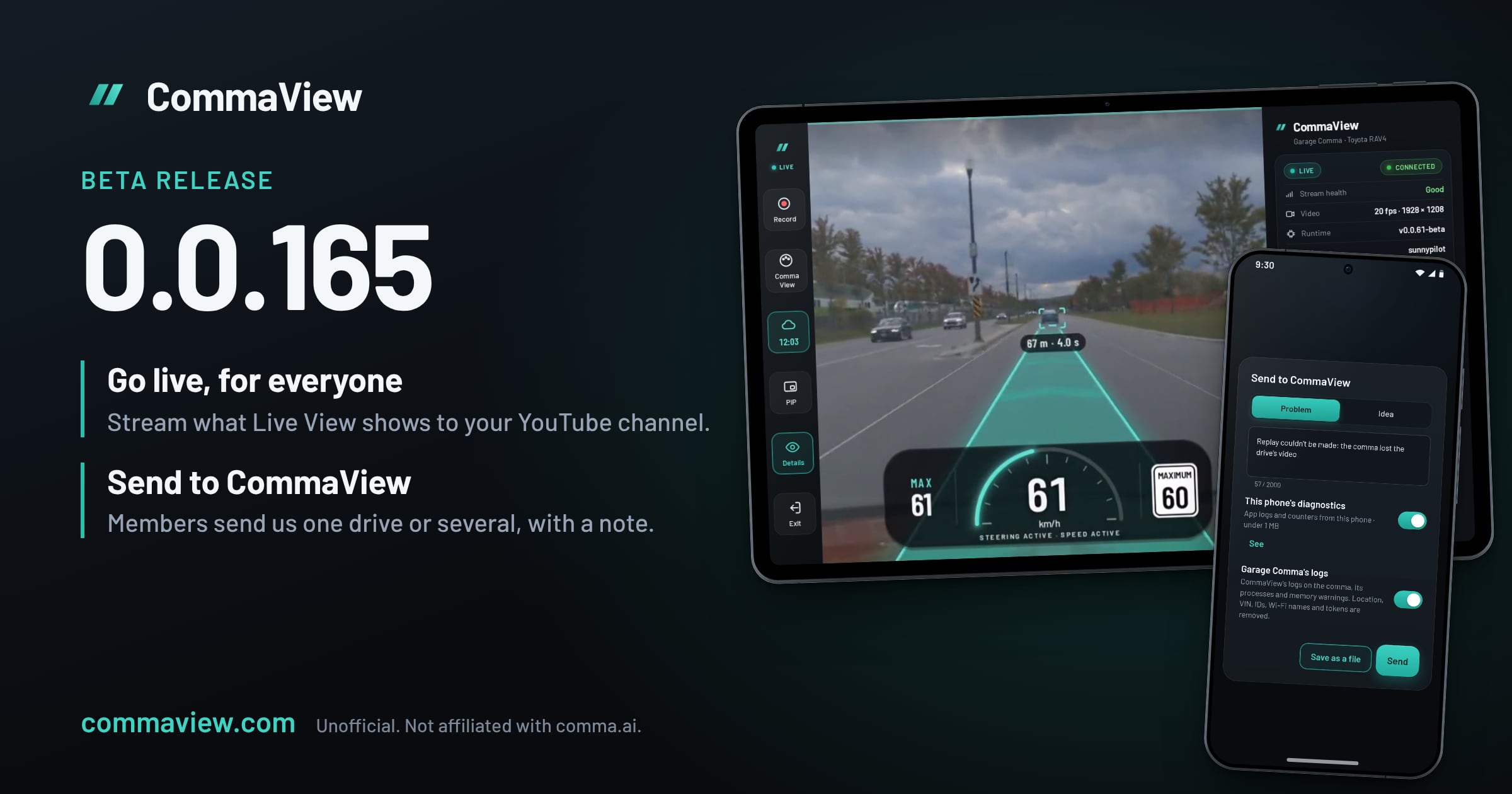
CommaView 0.0.165 is out for everyone in the beta. Go live is now for everyone, and Send to CommaView for every member, for one drive or several at once. With the new runtime, members can contribute drives to car detection, CommaView now installs on more openpilot forks, best effort, and your comma’s cameras and data go only to the phones paired with it.
It comes with runtime v0.0.61-beta. Update CommaView on every phone and head unit that watches your comma first, then update the runtime from the app when it offers it, and reboot the comma when the app asks. A phone or head unit left on 0.0.164 or older gets no video from a comma on runtime v0.0.61 or later.
Go live
Go live was in early access in 0.0.164. It’s now for everyone: Live View’s Go live streams what Live View shows, the road and CommaView’s overlay, to your YouTube channel or any RTMP server, at 720p or 1080p.
Set it up once in Settings › Live streaming: Sign in with YouTube, which makes, starts and ends each broadcast for you, or save a stream key or server. Go live then shows in Live View, or in its More menu where the screen has no room for it.
- Who can watch has its own row in Settings › Live streaming, and starts at Unlisted. Anyone watching sees where you drive.
- Sound is off unless you choose your comma’s microphone or your phone’s. It goes into your stream and your live copies, never to CommaView.
- When your comma’s Wi-Fi has no internet, the stream uses your phone’s mobile data. Settings says about how much an hour.
- YouTube sign-in and Go live now work when a VPN is your phone’s default network.
Navigation’s map and turn card are never in a stream.
Send to CommaView
Send to CommaView is now for every member. In Recordings, choose a drive your comma recorded, or select several, then Send to CommaView with a note on what happened. We get each drive’s road and wide video and its log, so we can see the problem; never the driver camera, sound or your car’s VIN.
Each drive downloads from your comma before it uploads, one at a time and oldest first, so keep the comma on and parked until it has. CommaView takes 20 uploads a day for each account; more wait for the next day.
The same Send to CommaView sheet now carries everything you send us: a Problem or an Idea, your note, and each attachment, which you can open with See or leave out. It opens from Settings › Support & diagnostics, from any error’s Report, and from a recording’s More menu.
Contribute to car detection
Surround, still in early access, runs its own car detector on your phone. Members can now help train it with their drives. You need the new runtime on your comma.
- With a tap: Contribute to car detection, in a drive’s More menu, or for several selected drives.
- Automatically: turn on Contribute drives automatically in Settings › Privacy & sharing › Car detection. Your comma’s recent drives go up, any drive it still has, when your phone and the comma are on a network you allow, up to a daily limit. Not in battery saver, or while you use Live View or record.
Upload contributions on chooses those networks. Networks I choose, the default, lists your phone’s mobile data and the Wi-Fi your comma has saved; tick the ones to use, each with a monthly limit if you want one. Contributions are about 110 MB a minute of drive. When your comma joins a Wi-Fi it hasn’t used before, Home and a notification ask whether to add it. Your comma says which network it’s on, so CommaView doesn’t need your location.
Know what you’re giving before you give it:
- A contribution is the whole drive: its road and wide video and its log, including where it went, from start to end.
- It’s for good. It becomes part of CommaView’s training collection and can’t be removed later. Nothing ties it to you or your comma.
- comma connect waits. While a drive is being sent, your comma keeps it for up to a day so openpilot doesn’t delete it, and openpilot’s uploader skips it meanwhile.
The app explains this once before your first contribution, and contributing stays off until you turn it on.
More openpilot forks, best effort
CommaView now installs on more openpilot forks, best effort. It lists openpilot and six of its forks, and checks each of them before every release. On any other openpilot fork, setup used to stop. Now it checks the fork, without changing anything, and if CommaView can add its view, it says “CommaView hasn’t verified this fork”: what’s drawn (the cameras, path, lanes, the car ahead, alerts and speed) and what isn’t. Install anyway installs on that fork only.
Live View draws it in openpilot’s look, or sunnypilot’s when the fork builds on sunnypilot’s screen, and names it, such as “BluePilotDev/bluepilot · best effort”. Uninstall runtime, in Device settings, puts the fork’s files back.
Checked in November 2026, dragonpilot, BluePilot, crwusiz, opgm, zoompilot, jixiexiaoge’s Carrot, NotAutopilot and more pass its install check; not tested on a car. The forks and the branches checked are on the supported forks page.
Two limits:
- Best effort. CommaView’s releases aren’t checked against your fork. If the fork updates itself into something CommaView can’t follow, CommaView’s view turns off and the fork drives as usual.
- The fork’s own screen isn’t drawn. Its buttons, colours and widgets don’t show in Live View, and forks built on openpilot’s older native screen aren’t supported at all.
Paired phones only
With the new runtime, your comma’s cameras and data go only to the phones and head units paired with it. When another one has the camera, Live View says “Another device is using this comma’s camera” and tries again by itself.
The runtime’s installs also recover now. A power cut or reboot mid-install puts the previous release back, an install keeps going when the app stops listening, and a download that stalls picks up where it stopped.
Also in 0.0.165
- Several drives at once. Select drives in Recordings to share them, make their replays, send them or delete them together.
- Live View fits every screen. Its controls no longer scroll or cut off Exit: what doesn’t fit goes into More, and larger text moves controls into More instead of shrinking anything. Live View is also lighter on the phone, and gets itself going again instead of freezing.
- Your requests. When you report a problem or send an idea while signed in, we can reply. Settings › Support & diagnostics › Your requests shows our replies, you get an email, and the conversation carries on at my.commaview.com.
- Settings, reorganised. Privacy & sharing says what leaves your phone. Help improve CommaView asks once whether to send crash reports and which driving software your comma runs.
- The leaderboard, for every member. It no longer depends on a feature flag.
- Experimental mode on newer openpilot. On openpilot’s nightly and sunnypilot dev, where chill mode is gone, Live View shows experimental mode as openpilot does.
- Support CommaView. Settings › Support & diagnostics › Support CommaView opens our Buy Me a Coffee page, to help cover hosting, testing and the iOS app. It unlocks nothing.
- Fixes. An Android 16 head unit no longer closes CommaView in Live View when its video decoder fails, and StarPilot’s comma 3X screen draws its camera on head units that showed it black.
Early access: Navigation and Surround
Navigation, Surround, Surround V2 and Experimental tools stay with a limited group of testers behind feature flags while we gather feedback.
- Navigation now shows a map in Live View during a trip, beside the video or in its corner, and Where to? with no trip. On the corner map, End and Mute are always there, End can be undone for 8 seconds, and you can say where to go.
- Navigation’s map now has Light and Dark themes, switching at sunrise and sunset where your comma is, so it reads in sun. Choose Auto, Same as the phone, Light or Dark in Settings › Maps & navigation › Map theme.
- Surround V2 is an experimental second renderer for Surround, under Settings › Experimental tools.
Some of these run on paid services, such as Navigation’s routing, so we’re keeping the group small for now. If you’d like to help test them, reach out on our Discord and be ready to tell us how they do on your drives.
How to update
CommaView is in an invite-only beta. If you’re in, the app offers 0.0.165 by itself.
- Update CommaView on every phone and head unit you use with your comma.
- Then update your comma’s runtime from the app.
- Reboot the comma when the app asks. Runtime updates wait until the car is in Park with openpilot disengaged, so a drive is never interrupted.
New to CommaView? The setup guide walks through installing the app and connecting your comma.
Further reading
- Which openpilot forks work with CommaView, and forks it doesn’t list
- What’s new in every release
- How CommaView releases work
- Privacy policy, for what Go live, Send to CommaView and contributions share
CommaView is unofficial and not affiliated with comma.ai, sunnypilot or any openpilot fork it works with. It is beta software and not a safety system: never let it distract you from driving.
Correction, November 13, 2026
Under Contribute to car detection, this post said a contribution has nothing that ties it to you or your comma. That went too far. A contribution names neither you nor your comma, but a drive’s route and video can show where you drive. From the next app version, the app says so and asks you to agree again before your next contribution; the privacy policy already said a contribution includes the drive’s route. The rest of the post is as it was published.